No style matches that name.
 cursivee.app
Glitch text generator
Turn your text into glitchy Zalgo text you can copy and paste. Ten styles and an intensity dial take it from a faint flicker to full corruption.
- 10 glitch styles
- Free, no sign-up
- One-click copy
- Works offline
How to use the glitch text generator
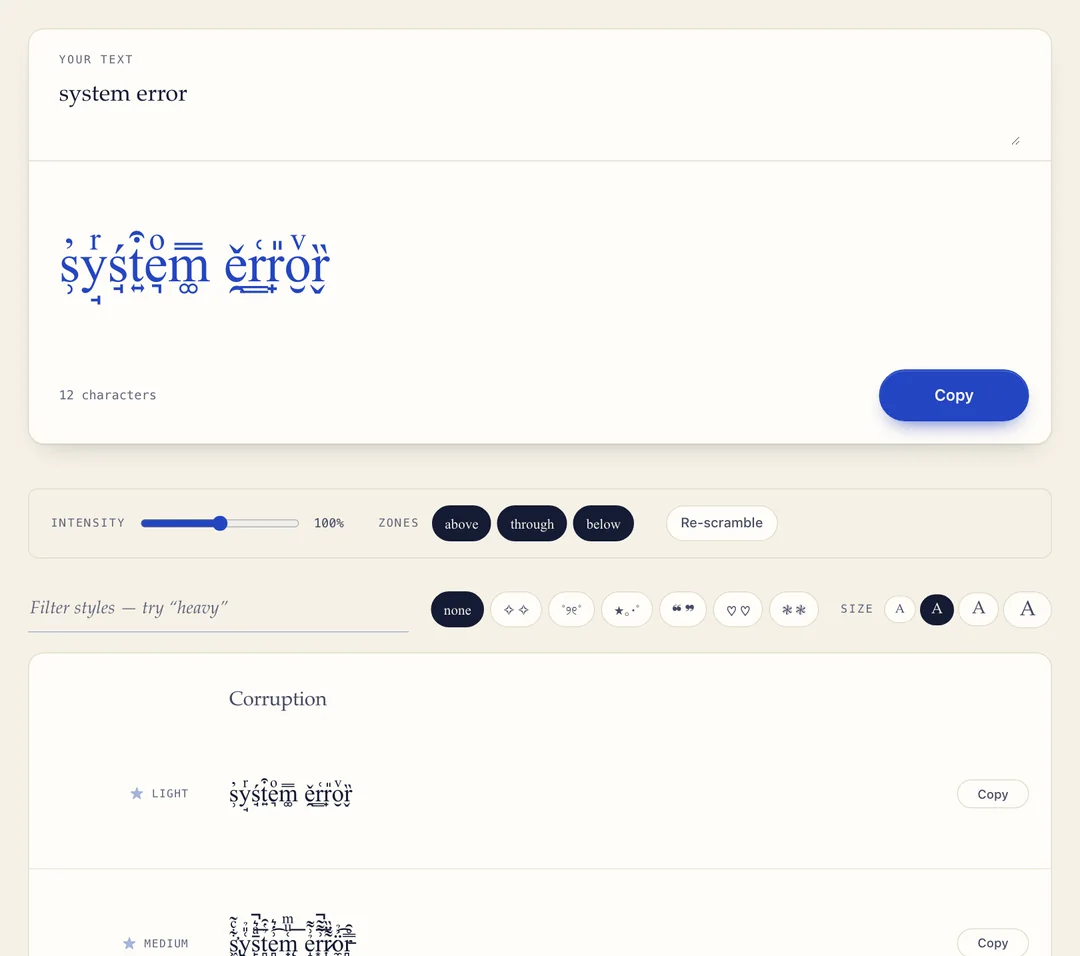
- Type your text. Enter it in the box at the top of the page. All ten styles update as you type.
- Set the damage. Drag the Intensity dial, and use the Zones toggles to put the marks above the letters, through them, or below.
- Copy and paste. Press Copy on the style you want and paste it into a caption, message or post. Press Re-scramble first for a different version with the same settings.
What is glitch text?
Glitch text — also called Zalgo text — is normal text with combining accent marks stacked on each letter, dozens deep, until they spill above and below the line. It is made entirely of Unicode characters, so it pastes anywhere plain text is allowed.
The marks are the same ones that build á, ñ and ç. Unicode lets a letter carry accent marks but never says how many, so the generator adds far more than anyone intended. Because the marks have no width, the text grows up and down instead of sideways — which is what makes it look broken.
10 glitch text styles to copy and paste
| Group | Styles | Example |
|---|---|---|
| Corruption | Light, medium, heavy and maximum: marks stacked above and below, deeper at each step | g̹̓l̘ͬí̘t͍͒c͉ͦh͚̿ |
| Directional | Rising climbs upwards only, sinking drips downwards only, crossed out runs through the letters | g̛͢͡͡l̵͞͡͝i̶̛͜͡t̷̶̶͟c̸̷̴͝h̶̷̕͟ |
| Static | Scratched, buzzing and shattered: flatter interference that stays inside the line | g̶̵l̶̵i̶̵t̶̵c̶̵h̶̵ · g̴͓l̴͓i̴͓t̴͓c̴͓h̴͓ |
Choosing an intensity: a low setting reads as unease, medium reads as damage, and maximum is the setting most likely to be clipped, filtered or flattened back into plain text.
Where glitch text works
- Works well: light and medium styles in Instagram and TikTok captions, Discord messages, posts on X and most chat apps.
- Test first: bios and display names. Use the static styles there — they stay inside the line.
- Avoid: maximum intensity in usernames or anywhere with a character limit. Some apps clip anything that overflows the line, and others strip combining marks altogether.
Want the letters themselves changed before they are corrupted? Use the cursed text generator. For the background, read what Zalgo text is and how it works. For clean, readable lettering with no marks at all, use the cursive generator.
Tips and limits
- Every mark counts as a character. At maximum intensity one letter can cost thirty characters, so a short bio can pass a 150-character limit while looking no longer.
- It holds still while you type. The randomness is seeded so the text does not reshuffle on every keystroke. Re-scramble gives you a new version.
- Hard on screen readers. Zalgo is read aloud as a stream of accent names with your word buried inside. Fine in a caption; keep it out of anything people need to read.
- Text, not a visual effect. It cannot be animated, colored or turned into an image. For moving glitch art — scan lines, RGB shift, datamoshing — you need a video tool.
Glitch text generator FAQ
How do I make glitch text?
Type in the box at the top of the page and the glitch text appears underneath in ten styles. Tune it with the Intensity dial and the Zones toggles, press Copy, and paste. Nothing is installed — the effect is made entirely of Unicode characters.
What is Zalgo text?
Ordinary text with combining accent marks stacked far past any normal depth. The marks are the same ones that build á, ñ and ç — just dozens per letter instead of one, so they pile up and spill over the line. The name comes from a 2000s internet horror meme; the technique is pure Unicode.
Is glitch text the same as Zalgo text?
In practice, yes. Zalgo is the original name; glitch text, glitchy text and corrupted text are the names most people search for now. This page makes all of them, plus flatter static styles that are not classic Zalgo.
Why does my glitch text get cut off or flattened?
There are two causes. Some apps clip anything that overflows the line, so the marks are still there but hidden. Others strip combining characters, which flattens the text for good. Light and Medium survive in far more places than Maximum.
Does glitch text count as more characters?
Yes, a lot more. Every mark is a real character. At maximum intensity a single letter can cost thirty, so a short bio can pass a 150-character limit while looking no longer on screen.
Why does it look the same every time I type?
On purpose. The randomness is seeded, so the corruption holds still while you edit instead of reshuffling on every keystroke. Press Re-scramble for a different version with the same settings.
Is glitch text harmful to my phone or account?
No. It is plain Unicode text and cannot carry anything harmful. The practical risks are social: heavy glitch text overlaps nearby lines, gets removed by filters, and is close to unreadable with a screen reader.
Can glitch text be removed again?
Yes, because the original letters are still underneath the marks. The guide to Zalgo text explains how to strip it back out. This page only converts in one direction.
More free text generators
Related guides
- z̹̓a̘ͬĺ̘g͍͒o͉ͦ What is Zalgo text, and how does it work? The mechanics of glitch text, where the name came from, and how to strip it back out.
- 𝓱 ≠ h Can screen readers read fancy text? What cursive Unicode sounds like read aloud, and six rules for using it considerately.
- □□□ ? Why fancy text shows up as boxes or question marks Three different symptoms, three different causes, and which styles are safest.