No style matches that name.
 cursivee.app
Small text generator
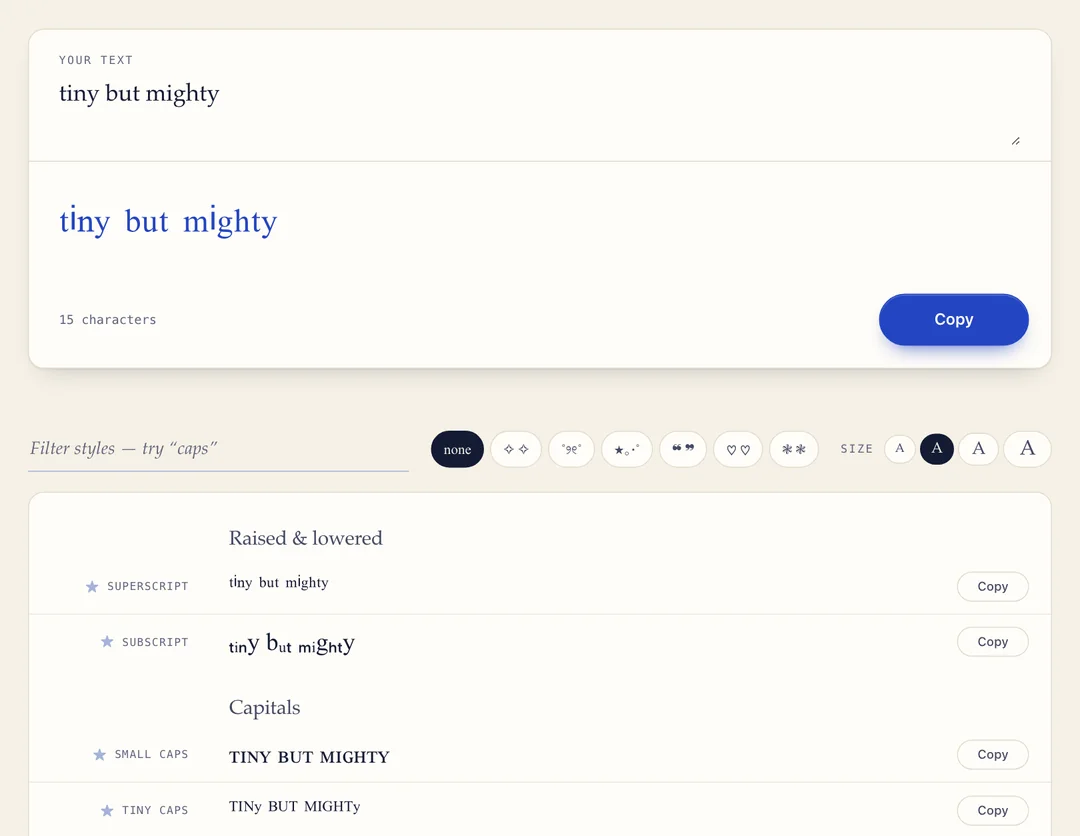
Turn your text into tiny letters you can copy and paste — superscript, subscript, small caps and tiny caps. Ideal for footnote marks, quiet details in a bio, and names that should look a size smaller.
- 5 small text styles
- Free, no sign-up
- One-click copy
- Works offline
How to use the small text generator
- Type your text. Enter it in the box at the top of the page. All five styles update as you type.
- Choose a style. Superscript, subscript, small caps, tiny caps or spaced small caps.
- Copy and paste. Press Copy and paste the result into a bio, caption, message or document.
What is small text?
Small text is made from Unicode characters that are genuinely smaller than normal letters: superscript (ˢᵐᵃˡˡ), subscript (ₛₘₐₗₗ) and small capitals (ꜱᴍᴀʟʟ). The size is built into the characters, so it survives copy and paste into apps that have no font-size setting.
Nobody designed these letters for social media. They exist because a chemist needed to write H₂O, a mathematician needed x², and a linguist needed a raised ʰ. That origin explains both why they work everywhere and why some letters are missing.
5 small text styles to copy and paste
| Style | What it looks like | Example |
|---|---|---|
| Superscript | Raised to the top of the line, like a footnote mark or an exponent | ˢᵐᵃˡˡ ᵗᵉˣᵗ ¹²³ |
| Subscript | Lowered beneath the line, like the 2 in H₂O | ₛₘₐₗₗ ₜₑₓₜ ₁₂₃ |
| Small caps | Capital shapes at lowercase height, sitting on the baseline | ꜱᴍᴀʟʟ ᴛᴇxᴛ |
| Tiny caps | Raised capitals, the smallest style here | ˢᴹᴬᴸᴸ ᵀᴱˣᵀ |
| Small caps, spaced | Small caps with a space between every letter | ꜱ ᴍ ᴀ ʟ ʟ |
Which one to pick: small caps stay readable across a whole line. Superscript and subscript are best in short bursts — an aside, a whispered afterthought, a footnote number.
Where tiny text works
- Works well: Instagram and TikTok bios, Discord messages and statuses, posts on X and Facebook, and most chat apps.
- Test first: usernames. They are the strictest field on any platform; bios and display names are a safer bet.
- Also useful for: writing m², x³ or CO₂ anywhere there is no formatting toolbar.
A good use in a bio: put your pronouns, city or job title in small text so they are present without competing with your name.
Tips and limits
- Some letters have no small form. There is no superscript q and no small-caps q or x, and subscript only covers a, e, h, i, j, k, l, m, n, o, p, r, s, t, u, v and x. Missing letters stay full size rather than being faked with a lookalike from another alphabet. Small caps has the fewest gaps.
- It will not save characters. Each small letter still counts as one character, and some count as more, so a bio at its limit gains nothing.
- Use it for tone, not essentials. Screen readers announce these as phonetic symbols or skip them, so keep names and links full size.
- It does not change the app's text size. It only changes which characters you paste. For decorative lettering instead, try the cursive text generator.
Small text generator FAQ
How do I make small text?
Type in the box at the top of the page. Each letter is swapped for a smaller Unicode character as you type, in five styles at once. Press Copy next to the one you want and paste it anywhere plain text is accepted — no font to install, no settings to change.
What is the difference between small caps and superscript?
Small caps sit on the baseline at lowercase height — ʟɪᴋᴇ ᴛʜɪꜱ — and read as quiet capitals. Superscript lifts letters to the top of the line — ˡⁱᵏᵉ ᵗʰⁱˢ — and reads as a footnote or an aside. Small caps stay legible at length; superscript is best in short bursts.
How do I type tiny text on Instagram, TikTok or Discord?
Those apps have no text-size setting, so you paste small characters instead. Convert your text here, copy a style, and paste it into your bio, caption or message. Bios, captions and chat messages usually keep it exactly as pasted.
Can I use small text in a username?
Sometimes. These are modifier and phonetic characters rather than plain letters, and username checks are the strictest on any platform. Bios and display names are a far safer bet, so test before you commit.
Why did some of my letters stay full size?
Because the small version of that letter was never added to Unicode. There is no superscript q and no small-caps q or x. Those letters stay at normal size rather than being faked with a character from another script.
Why does subscript have so many gaps?
Subscript letters were added for chemistry and mathematics, so only the letters needed for notation were encoded. There is no subscript b, c, d, f, g, q, w, y or z anywhere in Unicode.
Does small text take up less space?
Visually, yes. In character count, no — each small letter still counts as one character, and a few count as more. A bio at its limit will not gain room by shrinking.
Can screen readers read small text?
Poorly. They tend to announce these letters as phonetic or modifier symbols, or skip them. Use tiny text for tone and decoration, and keep names, links and anything important in ordinary letters. More in the guide to fancy text and screen readers.
More free text generators
Related guides
- 𝓱 ≠ h Can screen readers read fancy text? What cursive Unicode sounds like read aloud, and six rules for using it considerately.
- □□□ ? Why fancy text shows up as boxes or question marks Three different symptoms, three different causes, and which styles are safest.
- 𝓎ℴ𝓊𝓇 𝒷𝒾ℴ How to put cursive text in your Instagram bio Which fields accept cursive on Instagram, TikTok, Discord and X — and which strip it.